
Checklistor: Private Checklists for People Who Hate Productivity Apps
A private, no-login checklist maker for people who hate bloated productivity apps but still forget stuff.
11/16/2025
Most “productivity” tools don’t want to help you finish a task.
They want you to move into their building.
Account. Workspace. Onboarding. Email verification.
Suddenly you’re managing a tool instead of your actual life.
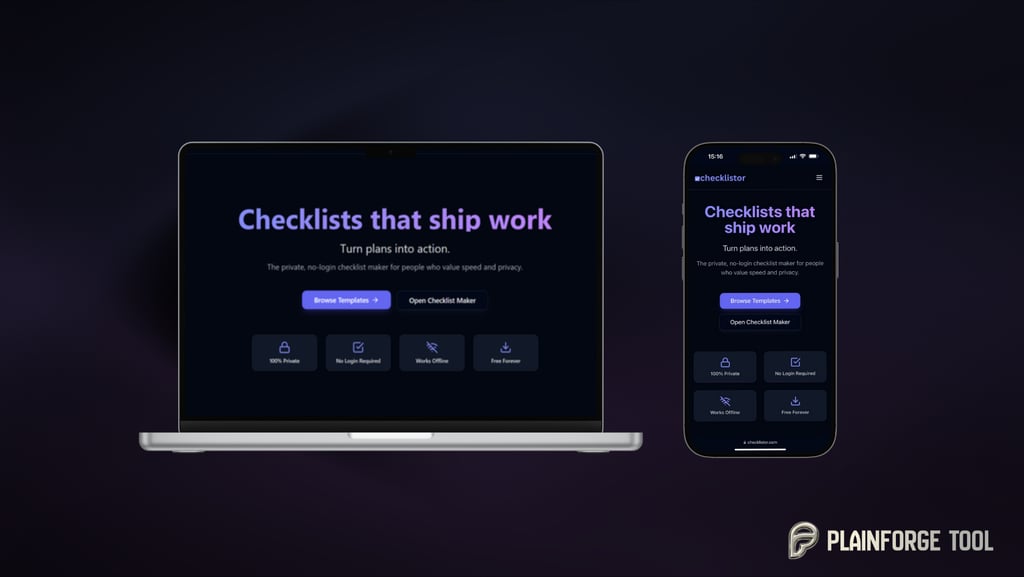
Checklistor is my answer to that nonsense.
It’s a private, no-login, offline-first checklist maker for people who just want to:
remember what to pack,
not forget a single launch step,
and stop rewriting the same list for the 14th time.
Why I built yet another tiny tool
My reality before Checklistor:
travel packing lists in random Notes
“moving house” steps in an old Google Doc
launch checklists buried inside tools I don’t even like anymore
paper lists that die in backpacks and jackets
Every time I needed a checklist, I was either searching or rebuilding it from scratch.
I didn’t need a new “workspace”. I needed a simple place where checklists live:
no login
no data collection
no subscription
works even when Wi-Fi is dead on a train somewhere
So I built Checklistor.
What Checklistor actually is
Core idea:
Small, local, honest checklists that stay on your device and don’t try to own your life.
The pillars:
100% private – your checklists live in your browser’s local storage
No login required – open the site, you’re in
Works offline – once loaded, you can use it in airplane mode
Free forever – no “free tier”, no trials, no paywall surprise
Exportable – PDF, Markdown, JSON so you’re never locked in
If the internet disappeared tomorrow, you could still run your day off Checklistor.
Templates: ready-made checklists for real life
The Templates page is where Checklistor feels a bit like a well-run fast food menu:
no fluff, just things people actually need.
You’ll find over 30+ checklists, including:
Moving House, Apartment Move-In/Move-Out
International Travel Packing, Carry-On Packing
Newborn Hospital Bag, Wedding Day Timeline
Website Launch / Migration, SEO Audit (Foundations)
New Phone Setup, New Laptop/PC Setup
YouTube Video Publish, Social Media Campaign Launch
Home Emergency Go-Bag, Home Office Setup, and more
You can:
filter by Home / Travel / Work / Events / Tech
scan by tags like printable, travel, emergency, web-dev, seo
open any template into the Maker and tweak it for your own reality
It’s basically: “don’t make me think, just show me the list” as a page.
Checklist Maker: your brain, but in sections
On /maker you get the Checklist Maker.
No timelines, no Gantt charts, no “boards”.
Just a clear structure:
create sections (“Packing”, “Before launch day”, “Morning of wedding”)
add items inside each section
drag things around until it matches how your brain works
When you’re done, you can:
Print / PDF – tape it to a fridge, bring it to a warehouse, hand it to a teammate
Copy Markdown – drop it straight into Notion, Obsidian, a GitHub repo, docs
Download JSON – keep a raw backup or wire it into your own scripts
Everything sits locally in your browser. Close the tab, come back later – your list is still there.
Embeddable Checklist Widget: give your website a to-do brain
Then there’s /embed.
This is for people who want checklists inside their own sites, help centers, wikis or tools.
You get:
Live Preview – see your interactive checklist as you build it
Customize panel – set:
widget title
background, text, primary and border colours to match your branding
An interactive checklist with:
add items
Print to PDF
Copy Markdown
Download JSON
Clear all
And then:
an iframe embed code you can paste into almost anything:
docs site
product onboarding page
online course lesson
internal wiki
Users can tick items, print them, copy them into their own system – and you don’t need to host some extra complex app to make it happen.
Privacy & offline: the non-negotiables
Checklistor leans hard into privacy:
Your checklists are stored with localStorage in your browser.
No servers store your lists.
No analytics, no tracking cookies, no third-party scripts spying on you.
One small cookie just remembers whether you hit “Accept” or “Decline” on the cookie banner. That’s it.
If you clear your browser storage, your lists go with it.
If you don’t, they stay yours, not mine.
This is the quiet part of Checklistor, but it matters more than any icon or gradient.
Who Checklistor is for
Founders & indie hackers – launch checklists, marketing routines, deployment steps
Agencies & freelancers – onboarding, QA passes, campaign prep, client handover
Families & humans – moving house, travel packing, newborn prep, wedding chaos
Content & course creators – “do-this-first” lists inside lessons and resources
People who live in docs – plug Markdown output into your existing writing tools
If you ever thought “I really should make a checklist for this so I stop forgetting things”… that’s where Checklistor sits.
Try it, break it, use it
Checklistor is still v1.0, but the foundations are solid:
offline-first architecture
private by design
30+ templates to start from
exports and embeds baked in
WCAG 2.2 AA accessibility level from the start
Use it however you like:
🔖 Home: checklistor.com
🧾 Templates: checklistor.com/templates
✏️ Maker: checklistor.com/maker
🔌 Embed widget: checklistor.com/embed
If it quietly removes a bit of chaos from your day and you want to keep it free, there’s a small yellow “Buy me a coffee” button in the footer. That’s the entire business model.
No subscriptions.
No “pro tier”.
Just tiny, honest tools that try to stay out of your way.
Contact
hello@plainforge.com
Support
Tips (or a coffee) keep the lights on and help cover servers & APIs, polish & fixes, new features, new tools.


Plainforge.com
Building tools that mind their manners. Free. No login. Privacy-first.
© 2025 Plainforge. All rights reserved.